-
1. Most companies run more than 1 webinar a month
According to the graphic, currently only 32% of companies are not running any webinars, while in contrast, 18% of companies run 1 to 3, 17% run 4 to 6 a month, 16% are running 7 to 12 webinars, 8% of companies rack up 13 to 26, and an even larger 9% of companies will run 27 or more in a given month!
Those numbers show that ground is ripe for webcasting/webinar providers. With a 68% majority of businesses running webinars each month, and 50% running somewhere between 4 and 27 (or more) webinars a month, why not? e3 livestream services can help you get started today. This shows that the services of webstreaming are in high demand in the corporate world.
-
2. People join webinars from all over the world
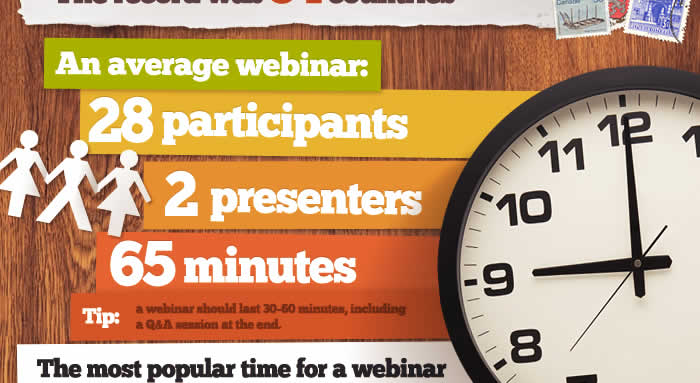
The demand for webcasting is not restricted by geographic borders, but rather it is a global phenomenon. As this graphic shows, people from the U.S.A., Canada, Brazil, Norway, the UK, France, Egypt, Iran, Russia, Japan, Australia and more joined the webinars that ClickMeeting studied. These webinar statistics show the average webinar had 28 participants, 2 presenters, and ran for 65 minutes. (A good webinar should last 30-60 minutes the Infographic tells us.) There were people from at least 2 countries in an average webinar, while the record number has been 54 countries represented in the attendance of a single webinar!
By incorporating webcasting into your company or event, you have the opportunity to reach an international audience!
-
3. The most popular time for a webinar
It’s also important to note what times are most expedient for webinars and webstreaming. Of those webinars researched on this Infographic, only 9% of them were held on Monday, then came Thursday with 16.7%, Friday with 17.9%, then Wednesday with 25.6%, and the most popular being Tuesday with 30.8% of the webinars being held on that day. As to time of day, the majority of the webinars were between 11am and 3pm. This shows that most webinars are on workdays during work hours, meaning that the market for webcasting/webinars is largely within corporations and businesses, though certainly not limited to that field.
-
4. Why do people organize webinars?
There are many reasons why one would organize a webinar and require webcasting services. Those give by the Infographic are: educating existing and potential customers (85%), lead generation (77%), building a strong position on the market (60%), converting new contacts (54%), making new contacts (31%), and making a webinar recording (30%). Whatever your reason may be, webcasting is an efficient and effective tool for businesses and events.
Next, ClickMeeting goes on to explain How to organize a webinar:
-
5. Traditional presentation: (1) About the company, (2) Our offer, (3) Our offer for you [or] Webinar presentation: (1) The main benefit, (2) Q&A, (3) Additional information, (4) Q&A, (5) Our offer, about the company, and (6) Q&A
In the traditional presentation approach you spend the majority of your time giving background on the company, what you offer in general and then only a small portion of the presentation is directed at the specific needs of the customer/audience (“Our offer for you”).
However, with a webinar, the structure is much more dynamic, allowing you to cut straight to the chase. You are freed to highlight the main benefits that your company/event is offering, and then give any additional information required as revealed by the interaction of the Q&A sessions. This means spending less time in exposition about the company, or general offers that are irrelevant to your particular audience. Thus, you get much greater effectiveness when you take advantage of webinars and webcasting for your presentation.
Lastly, the Infographic gives the modus operandi for Inviting participants and promoting the webinar:
-
6. When/Where?
Getting the word out beforehand is crucial. The Infographic gives a basic outline of what people do to invite and promote their webinar/event. At 7 days before you should have a sign up form on your website. By 2 days before you have been promoting it and discussing it on your blog. Then, by the time it’s 2 hours before you start cranking it out in newsletter[s], on social media, on LinkedIn, through professional websites and forums and event websites. These are some simple steps ways to get let people know about your event ahead of time.
-
7. Tools to use during webinar:
Because you’ll want to go back and see how it went, archive it, and more, you’ll definitely want to record your webinar/event. Then, your presentation begins. It may include audio + video elements; you may want to use a whiteboard during the event; and you will definitely want to utilize the chat feature of hosting meetings/events/webinars online.