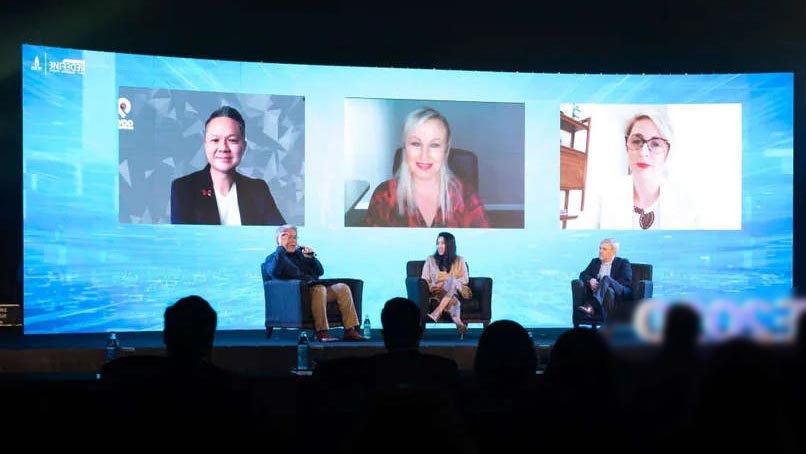
As an event planner, it is essential to stay on top of the latest trends in your industry.
Virtual events are becoming more and more popular among audiences due to the convenience and cost savings. However, if you don’t want to get left behind, there are other things you can do in order to pivot your live or virtual events into hybrid events that combine both physical and online components. Here are some tips for event planners who want a little help with this transition:
- Create a plan-B ahead of time so that when changes happen, you are prepared for any potential impact.
- Ensure that all your materials include links to relevant information about Covid
Event planners, are you planning an in-person event that will include remote participants? If so, it’s time to make the pivot.
Hybrid events have many benefits for event planners and attendees alike. Event planners get to meet their audience face-to-face while still catering to those who can’t attend in person. Hybrid events also allow for less risk than one would think – they’re easy to convert into virtual should circumstances demand it. This minimizes the possibility of your event being altogether canceled or postponed and/or significantly altered in terms of content if necessary. Attendees benefit from hybrid events by getting more out of them than just an online experience while still receiving a physical interaction at home!
Understandably, client interest in hybrid events has been steadily on the rise lately; however, there are still many questions around making the transition from in-person or virtual events to hybrid.
Make Sure the Venue Works for Hybrid
Find a venue partner who is flexible enough to adapt to any eventuality when it comes to the size of the live audience. Depending on the circumstances, the number of attendees allowed to participate in person may be smaller than you originally planned for or could even be restricted to a minimum. If you can, choose a venue that is designed to be flexible and even adapted for hybrid events. If possible, choose a venue with adequate internet bandwidth in place for the live stream and webcast.
So what do you do if there’s not enough time to plan? No need to panic. If things come up last minute that requires quick thinking, we’ve got you covered.
The beauty of hybrid events is that they work with any audience size, and can be easily converted to a purely virtual event.
Hybrid events are the perfect solution for any planner who needs to work with an unpredictable audience size. Not only is it easy to convert your live event into a hybrid, but you can also create a virtual component without significant overhead costs. Pivot away from your live/virtual dichotomy and try something new! Here are eight reasons why: 1) You’ll save money on venue fees 2) Your event will be more engaging 3) You can focus on small groups of people 4) It’s easier to reach out to international guests 5) You won’t have room conflicts 6) It’ll take less time 7) You’ll get more bang
Will It Work for Live Streaming
Picking a venue for your event can be made easier through the use of technology. When selecting the forum that will host your event, go for one that is well equipped to provide the necessary requirements for both live and virtual production. This includes sufficient in-house technology, the option to bring in an external audiovisual provider to take care of both the live and virtual production. A stable internet connection that is strong enough to support the live stream, optimized facilities, etc.
You will also need to consider the room layouts of your event and make sure it has suitable space for unobstructed camera angles. For example, you may want to have stage lighting set up in darker rooms.
Double the Audience, Double the Technology
Speaking of technology, even the simplest live events need certain amount of audiovisual equipment that are suited for the characteristics of the venue and make sure that the audience at the back of the room can hear and see everything as well as those who are sitting right in front of the stage. The same goes for virtual events which come with their own set of equipment requirements. If you pivot your event from solely a live setting to a hybrid one, you need to incorporate technology that works for your remote audience. This means that the live stream input and output will require equipment that is separate from the live event part of your set-up, and those extra cameras, mixing, virtual platform etc. will need additional crew to be running the live stream.
Test Early, Test Often!!!
As Murphy’s Law would have it, anything that can go wrong will go wrong. This is twice as true in the case of hybrid events that combine two sets of audio-visual technology. While a live audience will be mildly annoyed by microphone issues, it will cause your remote attendees to disappear in the blink of an eye and log off for good. Testing is key, and it does not apply only to AV – it is also true for the virtual platform, the presenters and MCs, the remote speakers (if you have any), the hybrid Q&As, the live streaming/broadcast service, and of course the rundown of your entire event.
You can greatly reduce the risk of experiencing technical difficulties by partnering with the right live stream video team. e3 Webcasting has the experience, equipment and connections to provide a winning solution at the event venue and online.
A Virtual Event Platform Is a Must
If you plan on hosting an event, it’s important to have a virtual event platform.
It serves as the venue for your remote attendees and allows your live audience to connect with them. If you planned for a virtual event and would like to pivot to a hybrid format, ensure that the platform can accommodate interaction from both audiences (such as direct messaging, forum, polling, Q&A, trade show/expo, and networking). We have several options depending on your budget ranging from an event-specific microsite to an elaborate platform.
Analyzing the Metadata via Analytics
It’s not just about how much you know; it’s also about what you do with what you know. And the best way to use that knowledge is by getting data from your attendees and using it to improve your event for future events.
With live events, it is difficult to measure feedback and engagement or any other data past the point of registration. Post-event surveys often do not provide a clear picture of what attendees really thought of your event or on what level they were engaged with your brand and content. With virtual events, you do not have this issue, as you get real-time feedback about their participation, engagement level, content preference, activity rate etc., through the virtual platform and the event management software. This type of information can help you understand how well an event went from start to finish and improve future events by providing necessary insight into which activities were popular among attendees and which ones weren’t so much.
Registration Options and Packages
We’ve all been there. You land on the website for your favorite event, and you click to register. But what if it turns out that you can’t attend in person? Or even worse – what if you need to cancel at the last minute because something comes up? Suppose that’s where you’re stuck now. In that case, we have good news: Hybrid events allow attendees to decide whether they can travel to the event location in person or join in remotely if circumstances prevent them from attending altogether. There used to be no such option with live events, but this doesn’t exist anymore with how life has changed today. This means that hybrid events are a much more attractive proposition than they ever were before!
Cater to Your Virtual Audience
As you pivot your in-person or virtual event to hybrid, thinking digital-first when formulating your agenda and content is vital. The reason for this is simple: without real-time interaction, virtual attendees have a different attention span than a live audience. Keeping their needs in mind will impact not just the length of sessions and the types of content you offer but also the length of your event. Cater to the virtual audience, by providing opportunities for more one-on-one time with speakers as well as ensuring there are plenty of breaks so they can get up and move around if they need to (after all, sitting at a computer or in front of a TV all day isn’t going to be conducive for many people).
Work With an Hybrid Event Live Streaming Partner
Pivoting your event to a hybrid format is not an easy job to do on your own, but working with an event production partner who has experience in creating and managing hybrid events takes that burden off you. Being comfortable with short event turn-around times, e3 Webcasting is fully prepared to adapt to changing circumstances, whether they involve an expanding or shrinking audience, the added virtual element, working with an event platform, and of course creating memorable event experiences both online and offline.
Don’t hesitate! Reach out today! We can help you take on this new challenge! Drop us an email at [email protected] or call us at: 1-888-695-2396